Modernize Your Legacy Application—Without the 18-Month Rewrite

Turn outdated WinForms, Visual Basic, Access, and older Java apps into modern, secure software your team can use anywhere—in a fraction of the time and cost of a traditional rewrite. AI speed, an experienced engineer checking every line, no documentation required.

Is Your Legacy Software Holding You Back?

Legacy code modernization transforms an aging application into modern, easy-to-maintain software—keeping how your business works intact while replacing the dying technology underneath. Your current app keeps running while we build, so your business never stops. The pains it solves:

Dying Technology

Your critical application runs on outdated platforms—WinForms, Visual Basic, Java legacy systems—where developers are scarce and expensive.

Lost Knowledge

The original developers have moved on, and there's little to no documentation. Your team is afraid to touch the code.

Platform Limitations

Locked into Windows-only desktop apps when you need web and mobile accessibility for modern business workflows.

Security Risks

Running unsupported software versions with known vulnerabilities, putting your business data and compliance at risk.

Time & Cost

Traditional rewrite projects take 12–18 months and cost hundreds of thousands. You need a faster, more affordable solution.

Business Stagnation

Unable to add new features or integrate with modern systems. Your software has become a competitive liability.

Platforms We Modernize

We move aging desktop and web platforms onto a modern, easy-to-maintain foundation. If yours isn't listed, ask—we'll tell you straight whether it's a good fit.

Legacy Platforms We Migrate From

WinForms (.NET) Visual Basic Java Legacy Systems Classic ASP PowerBuilder Delphi FoxPro Access Databases And More...

Modern Stacks We Build With

React React Native TypeScript Node.js Python Vue.js Angular .NET Core Progressive Web Apps Electron Cloud-Native

Target Platforms

Web Applications Mobile (iOS/Android) Progressive Web Apps Cloud Platforms Desktop Apps (Windows & Mac) API Services
SUCCESS STORY

WinForms Desktop App → Modern App on Any Device

A real-world modernization: a 15+ year old Windows-only business application, rebuilt as a modern web app that runs on any device.

The Challenge

A business ran its entire operation on a Windows-only WinForms C# desktop application—critical to the business, but increasingly limiting:

  • Locked to desktop Windows machines only
  • No mobile or tablet access for field staff
  • Built on aging technology fewer and fewer developers know
  • Limited ability to add modern features
  • Needed its own expensive in-office server hardware

The Solution

CodeShift AI rebuilt it as a modern web app with:

  • Works on desktop, mobile, and tablet
  • Built on modern, widely supported technology (React + TypeScript)
  • A reimagined, professional interface
  • Ready to run in the cloud
  • Stronger security and sign-in
  • Changes sync instantly across devices

Technical Transformation

Legacy Stack

  • WinForms (C# .NET Framework)
  • Windows Desktop Only
  • SQL Server
  • Monolithic Architecture
  • Manual Deployment

Modern Stack

  • React + TypeScript
  • Progressive Web App (PWA)
  • PostgreSQL
  • Cross-Platform (Web, Mobile, Tablet)
  • Cloud-Ready Architecture

Before & After
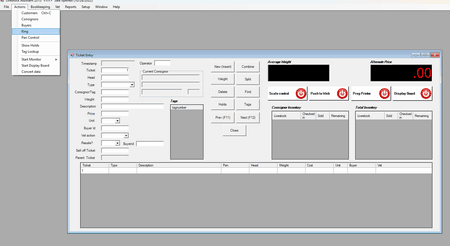
Legacy WinForms Desktop UI - Before Modernization

BEFORE: Legacy WinForms Desktop UI

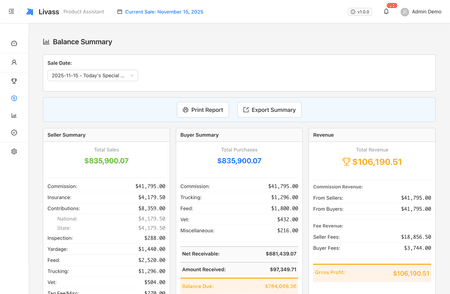
Modern web app interface - After Modernization

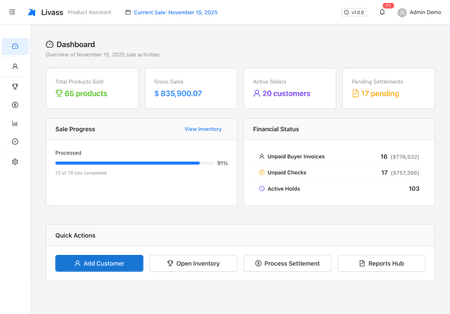
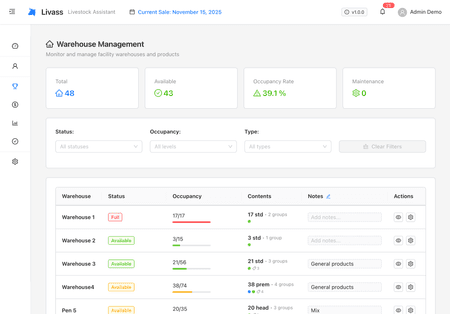
AFTER: The Modern Web App

Key Features Modernized

Business Operations

Complete operational workflow from data intake to processing and reporting

Financial Operations

Payments, transaction processing, and comprehensive financial reporting

Mobile Access

Staff can manage operations from tablets and phones anywhere in the organization

User Management

Secure sign-in, per-role permissions, and a full history of who changed what

Business Impact

Any Device
Desktop, Mobile, Tablet Access
Modern
Future-Proof Technology
Enhanced
Security & Authentication
Maintainable
Clean, Documented Code

Outcome: The client now runs on modern, easy-to-maintain software their team can use from any device, with stronger security and the ability to add new features quickly—cloud-ready and positioned for growth.

One App, Every Device

Desktop Experience
Desktop Application View 1
Desktop Application View 2

Mobile Experience

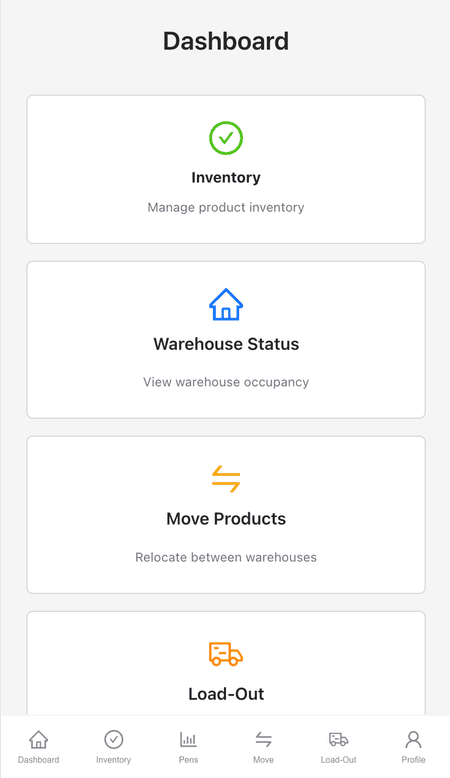
Mobile Application View 1
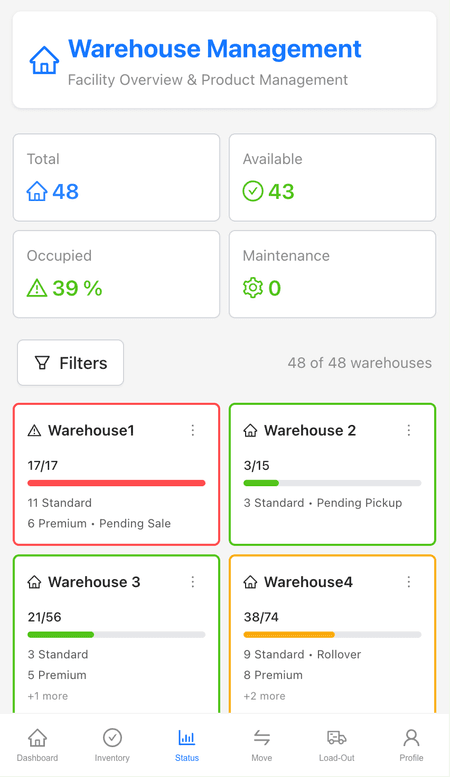
Mobile Application View 2

What It Costs

Straight numbers, before you ever have to talk to anyone.

Traditional consultancies quote $100,000 and up for a rewrite like this.

$15,000–$60,000

Modernization projects typically quote in this range—always as a fixed price, agreed before any work starts. Simpler single-purpose apps can come in below it; large multi-part systems can go above it.

What Moves the Number

Size of the appHow many screens, reports, and workflows your team relies on day to day.
What it connects toPayments, accounting, hardware, or other systems it has to work with.
Your dataHow much history needs to move over—and what shape it's in.

The free assessment turns this range into your number: a fixed quote for your app, no obligation.

Legacy Modernization FAQ

Common questions about modernizing legacy applications.

What is legacy code modernization?

Legacy code modernization is the process of transforming an outdated application—often a Windows desktop app built on aging technology—into modern, secure, maintainable software that runs on the web and mobile. CodeShift AI does this with supervised AI agents overseen by an experienced engineer, keeping the way your business works intact while replacing the old technology underneath.

Which legacy platforms can you modernize?

We migrate applications from WinForms, Visual Basic, legacy Java, Classic ASP, PowerBuilder, Delphi, FoxPro, and Microsoft Access, among others. We typically rebuild them as modern web apps (React/TypeScript) that run on any device, or as mobile apps.

Do you need our documentation or source code?

No documentation is required. Share whatever you have—source code, a walkthrough of the running app, or both—and our AI agents analyze it to learn exactly how your app works. We work from what exists, not from paperwork that often doesn't.

How long does modernization take, and what does it cost?

A traditional rewrite often takes 12 to 18 months and costs hundreds of thousands of dollars. Because supervised AI agents do most of the work, CodeShift AI modernizations typically quote between $15,000 and $60,000 as a fixed price, agreed before any work starts, and finish in a fraction of the traditional time. The free assessment gives you a fixed quote for your specific app before any commitment.

Will the modernized app work the same as the old one?

Yes—keeping your existing workflows and business rules intact is the priority. We rebuild the functionality your team relies on, then modernize the interface and add capabilities like mobile access and cloud sync. The goal is everything that worked before, plus what the old platform couldn't do.

Will it work on mobile and the web?

Yes. We typically rebuild Windows-only desktop applications as modern web apps that run on desktop, tablet, and mobile, so your team can work from anywhere instead of being tied to specific machines.

Is the modernized application more secure?

Yes. Modernization moves you off unsupported platforms with known vulnerabilities onto current, supported technology with modern sign-in security, per-role permissions, and security best practices built in—reducing the compliance and breach risk that aging software carries.

Ready to Modernize?

Tell us about your legacy app—and share the source code whenever you're ready. You'll get an honest assessment and a clear modernization roadmap. Free, no obligation.